
Replacement Key for Jeep: How to Program a New Key Fob (DIY)
If you need a replacement key for Jeep, the biggest question is usually not whether a new fob can be programmed. It is whether the process is affordable, repeatable, and compatible with your specific vehicle. For many Chrysler, Dodge, Jeep, and some Volkswagen models, a do-it-yourself programming approach can be a practical alternative to dealer pricing.
This guide walks through what you need, how programming usually works, what to check before you buy, and what to do if something does not go as planned.
In this guide
What “replacement key for Jeep” really means
When people say “replacement key for Jeep,” they usually mean one of these:
- A key fob remote with lock, unlock, panic buttons, and sometimes remote start
- A keyless entry fob that needs to be paired to the vehicle
- Programming an extra fob when you already have at least one working key
Important: Many DIY programming options require that you already have one working key FOB. If you have lost all keys, the process is usually different.
Before you buy: verify compatibility first
Different trim levels and model years may use different fobs and programming methods. Always verify compatibility before ordering anything.
- Go to Tom’s Key
- Use the vehicle search on the homepage
- Select your exact year, make, and model
- Confirm the listed fob style matches your vehicle
If your exact vehicle is not listed, it is best to confirm fitment before buying.
What you need for DIY key fob programming
Requirements vary by vehicle, but most DIY-compatible setups use the same basic checklist.
Core items
- At least one working key FOB for the vehicle
- A compatible replacement remote
- A compatible programmer kit
- Access to the OBD-II port under the dash
Recommended product
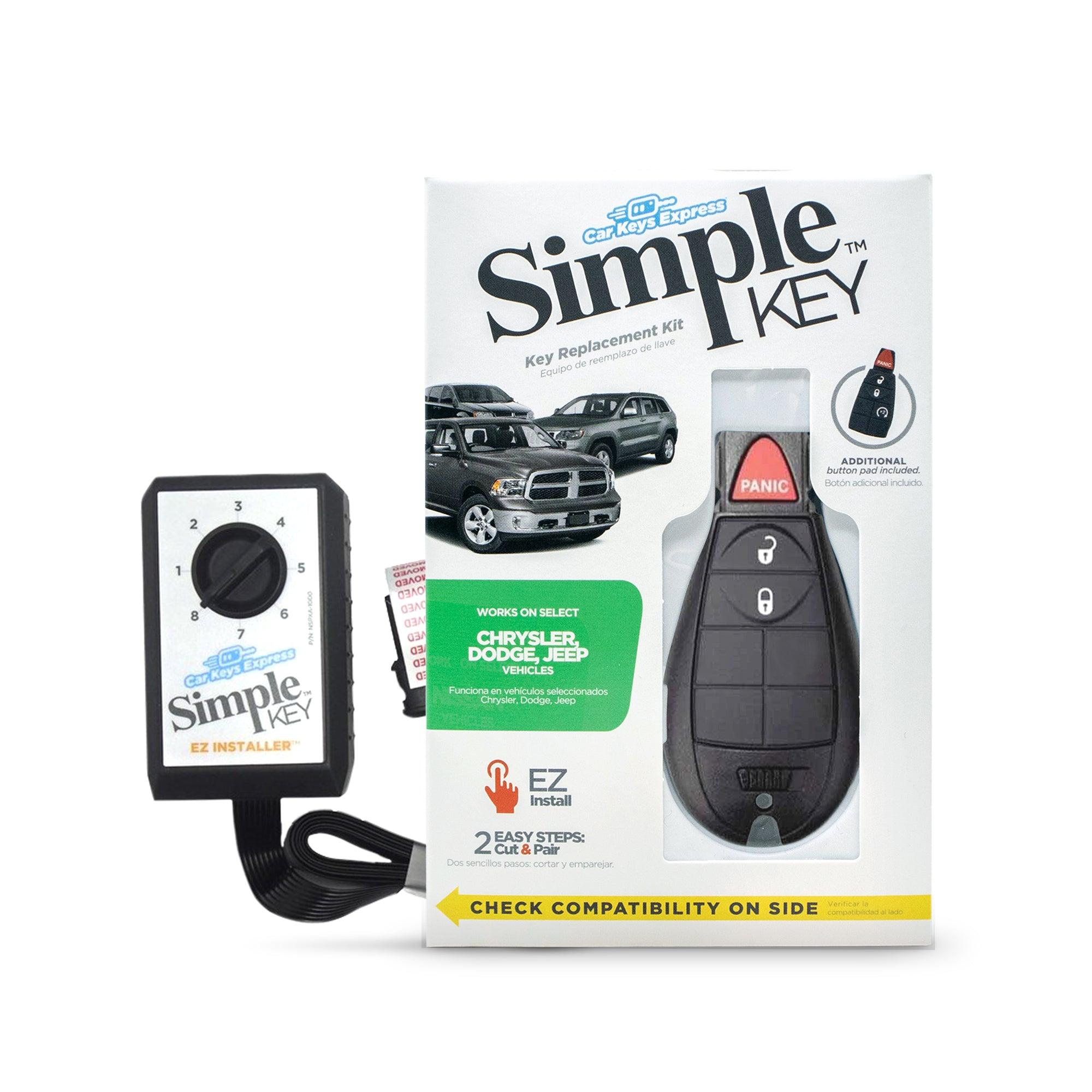
Simple Key Programmer for Non-Proximity Remote Key FOB
If your vehicle is on the compatibility list, this is the kit that matches the process covered in this article.
- Includes 1 key fob
- Requires at least 1 working key FOB
- Can program up to 8 key fob remotes for the vehicle
- Made for select Chrysler, Dodge, Jeep, and Volkswagen models
- Backed by a money-back guarantee for compatible vehicles
$119.95
Shop This Programmer KitDIY programming overview: the typical pairing flow
While each kit has its own exact directions, the general programming flow for many supported Chrysler, Dodge, Jeep, and Volkswagen models usually looks like this:
- Set the programmer to the correct configuration for your vehicle
- Activate the fob if your kit requires it
- Prepare the vehicle with the ignition off and the correct gear position selected
- Plug the programmer into the OBD-II port
- Insert the working key and switch to the required ignition position without starting
- Press the programmer button to begin pairing
- Wait for the success signal, then disconnect and test the new fob
Some supported vehicles can program multiple remotes in one session, but that can vary by application.
Step-by-step: programming a replacement key for Jeep
Use this checklist as a practical overview. Always follow the instructions included with your exact kit.
1) Configure the programmer for your vehicle
- Review the included guide for your year and model
- Set the dial or programming position exactly as directed
- Remove any seal or insert only if your instructions say to do so
2) Activate the replacement fob if required
Some fobs arrive inactive and need to be activated before pairing.
- Watch for the expected indicator light behavior
- Enter any required activation sequence exactly as shown in the guide
3) Prepare the vehicle
- Close all doors fully
- Put the vehicle in the required state, often Park
- Turn on flashers if your instructions require it
- Turn off extra electrical loads like headlights, radio, and fan if directed
4) Connect the programmer to OBD-II
- Find the OBD-II port under the dash near the pedals
- Plug in the programmer and wait for the communication signal
5) Put the ignition in the correct run or on position
- Use your working key
- Switch to the required position
- Do not start the vehicle unless your instructions specifically say to
6) Initiate pairing
- Press the programmer button as instructed
- Wait for the confirmation tone, chime, or beep pattern
7) Disconnect and test the new fob
- Remove the new fob after programming is complete
- Unplug the programmer
- Test lock, unlock, panic, and any original buttons your vehicle supports
If your replacement fob includes an extra button your original did not have, that extra button will not add a new feature to the vehicle.
Ready to do this yourself?
If you already have one working key FOB and your vehicle matches the supported list, this is the point where most readers stop researching and get the kit they need.
Troubleshooting: what to do if it will not program
If pairing fails, the cause is usually one of a few common issues.
Common causes
- Wrong programmer setting for your exact vehicle
- Fob was not activated when required
- Vehicle was not in the correct state during programming
- Loose or incorrect OBD-II connection
- Too much electrical load left on during the process (lights on, AC on)
Quick checks
- Double-check the setup for your year, make, and model
- Confirm the fob activation process was completed correctly
- Repeat prep steps with doors closed and extra electronics off
- Reconnect the OBD-II programmer and wait for the communication signal again
If it still does not work for a supported vehicle, use the support information included with your purchase.
Frequently asked questions
Can I program a replacement key for Jeep without going to a dealer?
For many supported models, yes. You usually need at least one working key FOB and the correct programming kit.
What if I lost all my Jeep keys?
Lost-all-keys situations usually require a different solution than adding a spare.
Do I need to activate the new fob?
Some fobs do. Some do not. Follow the exact instructions included with the kit.
Will a 5-button fob add remote start if my original did not have it?
No. Only the original remote button features supported by your vehicle will work.
Key takeaways
- A replacement key for Jeep is usually a programming and pairing job, not just a simple replacement
- Compatibility comes first
- You typically need at least one working key FOB
- The right programmer kit can make the process much easier at home
Compatible vehicles covered in this article
Compatible Chrysler vehicles
- 300: 2008–2010
- Town & Country: 2008–2016
Compatible Dodge vehicles
- Challenger: 2008–2014
- Charger: 2008–2010
- Dart: 2013–2016
- Durango: 2011–2013
- Grand Caravan: 2008–2020
- Journey: 2009–2010
- Magnum: 2008
- Ram 1500: 2009–2017
- Ram 2500: 2009–2017
- Ram 3500: 2009–2017
Compatible Jeep vehicles
- Commander: 2008–2010
- Grand Cherokee: 2009–2010
Compatible Volkswagen vehicles
- Routan: 2009–2014
Get the right programmer kit for this DIY process
This article lines up with the Tom’s Key Simple Key Programmer for select Chrysler, Dodge, Jeep, and Volkswagen non-proximity remote key FOB applications.
Shop the Simple Key Programmer